Tinker Tailor
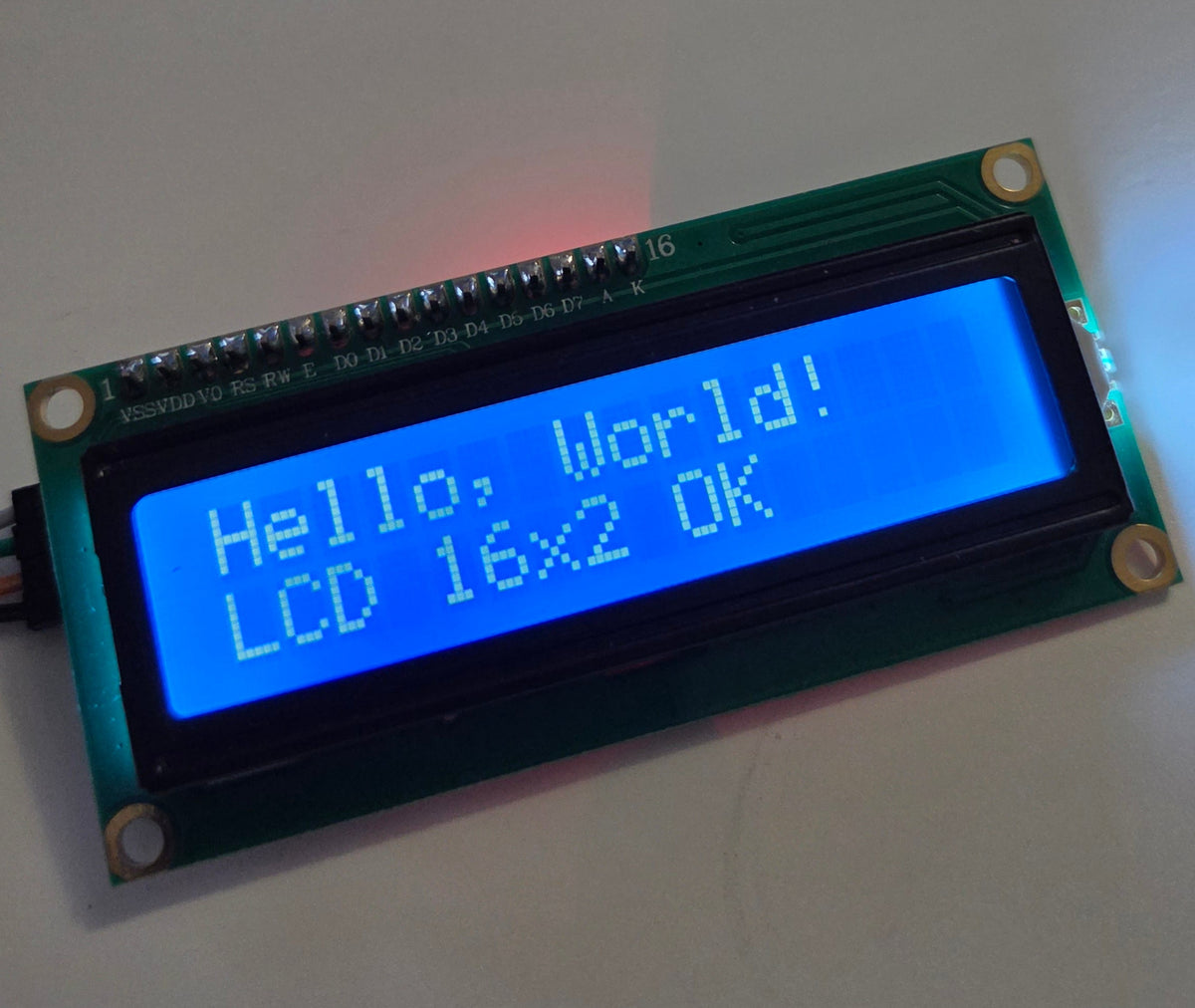
LCD1602 I2C Character Display 16x2, Blue (PCF8574, 5V)
LCD1602 I2C Character Display 16x2, Blue (PCF8574, 5V)
Regular price
$12.99 CAD
Regular price
Sale price
$12.99 CAD
Shipping calculated at checkout.
Quantity
Couldn't load pickup availability
A 16 character x 2 line LCD with a blue screen and an I2C (IIC) adapter built on the PCF8574. The I2C interface needs only two signal wires plus power, which saves GPIO pins on your microcontroller compared with a standard parallel 1602 LCD.
Warning: may produce weird and wonderful projects. Try the Maker-O-Matic 3000.
Ships next business day from Nova Scotia · 30-day returns · Questions? cmoz@tinkertailor.ca
Add this too


Details
- 16x2 character display (LCD1602), blue screen
- I2C / IIC interface via PCF8574 adapter
- 5V operation - this needs 5V to work reliably!
- Backlit screen for easy reading
- Works with Arduino and similar microcontrollers
A simple, readable text display for sensor readouts, menus and status messages in your projects.
Want to get started right away - here is code I've tested with my screen. It runs through samples of what is possible, so it's a great place to get started. Modify it to make it your own!
// 16x2 I2C LCD test (ESP32) - PCF8574 backpack at 0x27
//
// Wiring (4 lines):
//   LCD GND -> ESP32 GND
//   LCD VCC -> ESP32 5V (VIN)
//   LCD SDA -> GPIO 21
//   LCD SCL -> GPIO 22
//
// If the backlight is on but no text shows (or you see a row of solid
// blocks), turn the blue contrast pot on the back of the backpack.
//
// No library needed. Backpack pin mapping (standard):
//   P0 = RS, P1 = RW, P2 = EN, P3 = backlight, P4..P7 = D4..D7

#include <Arduino.h>
#include <Wire.h>

#define PIN_SDA 21
#define PIN_SCL 22

static uint8_t lcdAddr = 0x27;

#define BIT_RS 0x01
#define BIT_EN 0x04
#define BIT_BL 0x08

static uint8_t backlight = BIT_BL;

// ---------- low-level I2C ----------

static void pcfWrite(uint8_t val) {
  Wire.beginTransmission(lcdAddr);
  Wire.write(val | backlight);
  Wire.endTransmission();
}

static void lcdPulse(uint8_t val) {
  pcfWrite(val | BIT_EN);
  delayMicroseconds(1);
  pcfWrite(val & ~BIT_EN);
  delayMicroseconds(50);
}

static void lcdWrite4(uint8_t nibble, uint8_t mode) {
  uint8_t val = (nibble << 4) | mode;
  pcfWrite(val);
  lcdPulse(val);
}

static void lcdSend(uint8_t byte, uint8_t mode) {
  lcdWrite4(byte >> 4, mode);
  lcdWrite4(byte & 0x0F, mode);
}

static void lcdCommand(uint8_t cmd) { lcdSend(cmd, 0); }
static void lcdData(uint8_t data) { lcdSend(data, BIT_RS); }

// ---------- LCD text ----------

static void lcdClear() {
  lcdCommand(0x01);
  delay(2);
}

static void lcdSetCursor(uint8_t col, uint8_t row) {
  lcdCommand((row == 0 ? 0x80 : 0xC0) | col);
}

static void lcdPrint(const char *s) {
  while (*s) lcdData(*s++);
}

// Print text on a row, padded with spaces to clear old characters
static void lcdLine(uint8_t row, const char *s) {
  char buf[17];
  snprintf(buf, sizeof(buf), "%-16s", s);
  lcdSetCursor(0, row);
  lcdPrint(buf);
}

static void lcdCreateChar(uint8_t slot, const uint8_t pattern[8]) {
  lcdCommand(0x40 | ((slot & 7) << 3));
  for (int i = 0; i < 8; i++) lcdData(pattern[i]);
}

static void lcdBacklight(bool on) {
  backlight = on ? BIT_BL : 0;
  pcfWrite(0);
}

static void lcdInit() {
  delay(50);
  pcfWrite(0);
  delay(10);

  // HD44780 4-bit wake-up sequence
  lcdWrite4(0x03, 0);
  delay(5);
  lcdWrite4(0x03, 0);
  delay(5);
  lcdWrite4(0x03, 0);
  delayMicroseconds(150);
  lcdWrite4(0x02, 0);  // switch to 4-bit mode

  lcdCommand(0x28);  // 4-bit bus, 2 lines, 5x8 font
  lcdCommand(0x0C);  // display on, cursor off, blink off
  lcdClear();
  lcdCommand(0x06);  // left-to-right, no shift
}

// ---------- bus scan ----------

static bool i2cPresent(uint8_t addr) {
  Wire.beginTransmission(addr);
  return Wire.endTransmission() == 0;
}

static void scanBus() {
  Serial.println("I2C scan:");
  int found = 0;
  for (uint8_t a = 1; a < 127; a++) {
    if (i2cPresent(a)) {
      Serial.printf("  found 0x%02X\n", a);
      found++;
    }
  }
  if (!found) Serial.println("  nothing found - check wiring/power");

  // PCF8574 lives at 0x20-0x27, PCF8574A at 0x38-0x3F
  for (uint8_t a = 0x27; a >= 0x20; a--) {
    if (i2cPresent(a)) { lcdAddr = a; break; }
  }
  if (!i2cPresent(lcdAddr)) {
    for (uint8_t a = 0x3F; a >= 0x38; a--) {
      if (i2cPresent(a)) { lcdAddr = a; break; }
    }
  }
  Serial.printf("Using LCD at 0x%02X\n", lcdAddr);
}

// ---------- demo ----------

static const uint8_t heart[8] = {0x00, 0x0A, 0x1F, 0x1F, 0x0E, 0x04, 0x00, 0x00};
static const uint8_t smiley[8] = {0x00, 0x0A, 0x0A, 0x00, 0x11, 0x0E, 0x00, 0x00};
static const uint8_t block[8] = {0x1F, 0x1F, 0x1F, 0x1F, 0x1F, 0x1F, 0x1F, 0x1F};

void setup() {
  Serial.begin(115200);
  delay(500);
  Serial.println("\n16x2 LCD test");

  Wire.begin(PIN_SDA, PIN_SCL);
  Wire.setClock(100000);

  scanBus();
  lcdInit();

  lcdCreateChar(0, heart);
  lcdCreateChar(1, smiley);
  lcdCreateChar(2, block);
  lcdSetCursor(0, 0);  // leave CGRAM mode

  lcdLine(0, "Hello, World!");
  lcdLine(1, "LCD 16x2 OK");
  delay(2000);
}

void loop() {
  // 1. Backlight on/off blink
  lcdLine(0, "Backlight test");
  for (int i = 0; i < 3; i++) {
    lcdLine(1, "> OFF");
    lcdBacklight(false);
    delay(500);
    lcdLine(1, "> ON");
    lcdBacklight(true);
    delay(500);
  }

  // 2. Full block fill - spots dead pixels or missing segments
  lcdClear();
  for (uint8_t row = 0; row < 2; row++) {
    lcdSetCursor(0, row);
    for (int i = 0; i < 16; i++) lcdData(2);
  }
  delay(1500);

  // 3. Character set check
  lcdLine(0, "ABCDEFGHIJKLMNOP");
  lcdLine(1, "0123456789!?#&*%");
  delay(2000);
  lcdLine(0, "abcdefghijklmnop");
  lcdLine(1, "qrstuvwxyz<>()[]");
  delay(2000);

  // 4. Custom characters
  lcdClear();
  lcdSetCursor(0, 0);
  lcdData(0);
  lcdPrint(" Custom chars ");
  lcdData(0);
  lcdSetCursor(4, 1);
  for (int i = 0; i < 4; i++) {
    lcdData(1);
    lcdData(' ');
  }
  delay(2000);

  // 5. Scrolling message
  const char *msg = "                This is a scrolling test message...                ";
  int len = strlen(msg);
  lcdLine(0, "Scroll test:");
  for (int i = 0; i <= len - 16; i++) {
    char buf[17];
    memcpy(buf, msg + i, 16);
    buf[16] = '\0';
    lcdSetCursor(0, 1);
    lcdPrint(buf);
    delay(150);
  }

  // 6. Live uptime counter
  lcdLine(0, "Uptime:");
  for (int i = 0; i < 50; i++) {
    char buf[17];
    snprintf(buf, sizeof(buf), "%lu.%lu s", millis() / 1000, (millis() / 100) % 10);
    lcdLine(1, buf);
    delay(100);
  }
}; PlatformIO Project Configuration File
;
; Build options: build flags, source filter
; Upload options: custom upload port, speed and extra flags
; Library options: dependencies, extra library storages
; Advanced options: extra scripting
;
; Please visit documentation for the other options and examples
; https://docs.platformio.org/page/projectconf.html
[env:esp32dev]
platform = espressif32
board = esp32dev
framework = arduino
monitor_speed = 115200