Tinker Tailor
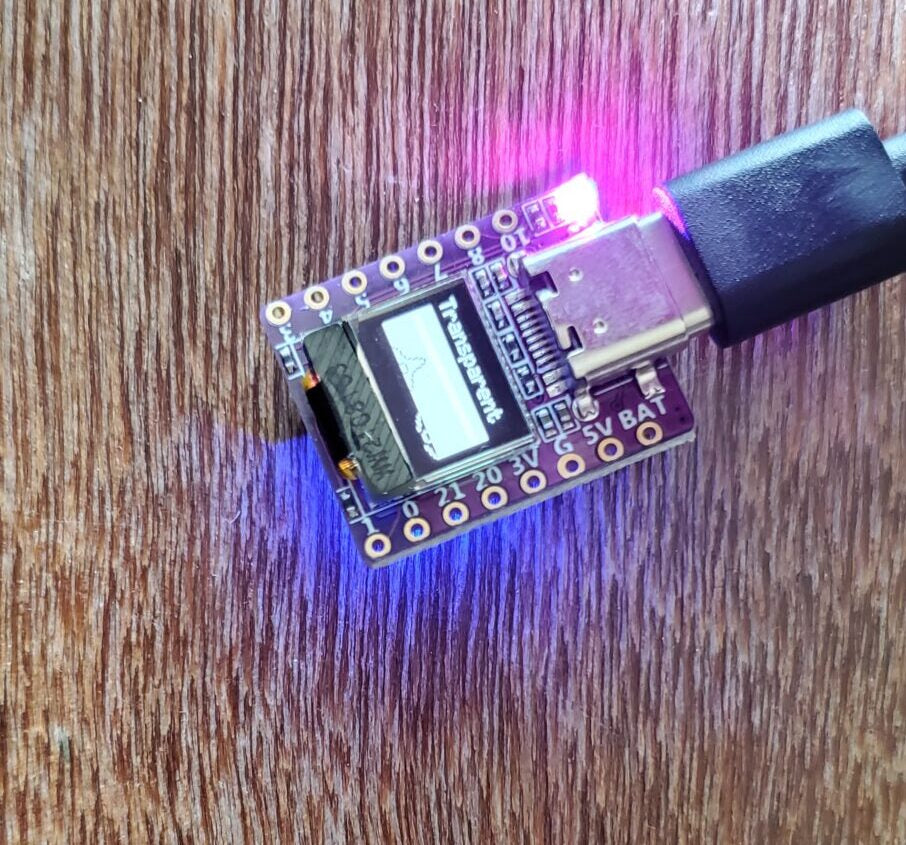
ESP32 C3 with 0.42 inch screen
ESP32 C3 with 0.42 inch screen
Regular price
$19.75 CAD
Regular price
Sale price
$19.75 CAD
Shipping calculated at checkout.
Quantity
Couldn't load pickup availability
Not sure which board? Compare every board by chip, touch pins, size and wireless.
Microcontroller Guide →Canadian-owned and packed by hand in Nova Scotia, so there's no cross-border duty or brokerage. Shipping rates
A compact ESP32-C3 development board with a built-in 0.42" display for real-time data output — all in a 23.5×18mm footprint. RISC-V single-core processor, integrated WiFi and Bluetooth 5 LE, and USB-C for programming. Works with Arduino, MicroPython, and ESP-IDF.
Warning: may produce weird and wonderful projects. Try the Maker-O-Matic 3000.
Ships next business day from Nova Scotia · 30-day returns · Questions? cmoz@tinkertailor.ca
Add this too


Details
Key Features
- SoC: ESP32-C3FH4, RISC-V single-core
- Memory: 4MB Flash, 400KB SRAM
- Wireless: 2.4GHz WiFi + Bluetooth 5 LE
- Display: Integrated 0.42" screen
- GPIO: 11 pins — I2C, I2S, UART, SPI, PWM, ADC
- 1 × RGB LED, 1 × Reset button
- USB-C (USB-to-Serial interface, no native USB)
- Ceramic antenna
- Dimensions: 23.5 × 18mm | Weight: ~2.6g
Related products
- Want a 5×5 RGB LED matrix instead of a screen? Try the ESP32-C3 Board with 25×WS2812B Matrix.
- Need a compact ESP32-C3 without extras? See the Beetle ESP32-C3.
- Want a standard 30-pin ESP32? See the ESP32 Development Board 30-pin.
; ============================================================
;  Test 1: find the screen pins on the ESP32-C3 0.42 inch board
;  CMozMaker | tinkertailor.ca
; ============================================================

; --- Environment 1 (default): normal serial ---
[env:c3_screen_test]
platform = https://github.com/pioarduino/platform-espressif32/releases/download/stable/platform-espressif32.zip
framework = arduino
board = esp32-c3-devkitm-1
monitor_speed = 115200

; U8g2 is the library that draws on the tiny screen.
lib_deps =
    olikraus/U8g2

; --- Environment 2: only use this if environment 1 shows nothing on
; the Serial Monitor. Your board may use the chip's built-in USB,
; which needs these two flags to print to the monitor.
[env:c3_screen_test_usb]
platform = https://github.com/pioarduino/platform-espressif32/releases/download/stable/platform-espressif32.zip
framework = arduino
board = esp32-c3-devkitm-1
monitor_speed = 115200
build_flags =
    -DARDUINO_USB_MODE=1
    -DARDUINO_USB_CDC_ON_BOOT=1
lib_deps =
    olikraus/U8g2
// ============================================================
// Tinker Tailor demo for the ESP32-C3 0.42 inch screen board
// tinkertailor.ca
//
// The screen is 72 x 40 pixels. This demo cycles through
// five short scenes (the last one lasts until the message has finished):
// 1. Logo splash
// 2. A needle sewing a running stitch
// 3. Current flowing along a conductive thread to an LED
// 4. A field of white foxes drifting across the screen
// 5. A scrolling message
//
// The onboard RGB LED changes colour to match each scene.
//
// Pins on this board (already wired for you):
// Screen SDA = GPIO5, screen SCL = GPIO6
// RGB LED (WS2812) data = GPIO2
// ============================================================
#include <Arduino.h>
#include <Wire.h>
#include <U8g2lib.h>
const int SDA_PIN = 5;
const int SCL_PIN = 6;
const int LED_PIN = 2; // onboard RGB LED
// 72x40 OLED, hardware I2C. No pins here, we set them in setup().
U8G2_SSD1306_72X40_ER_F_HW_I2C display(U8G2_R0, U8X8_PIN_NONE);
const int SCREEN_W = 72;
const int SCREEN_H = 40;
// How long each scene plays, in milliseconds
const unsigned long SCENE_TIME = 5000;
// The scrolling message scene lasts as long as the message needs.
// We work this out once in setup().
unsigned long scrollSceneTime = SCENE_TIME;
const char* scrollMessage = "Conductive fabrics, e-textiles and more at tinkertailor.ca ";
int currentScene = 0;
unsigned long sceneStart = 0;
// ---------- Scene 1: logo splash ----------
void sceneSplash(unsigned long t) {
display.setFont(u8g2_font_helvB10_tr);
display.drawStr(8, 15, "Tinker");
display.drawStr(14, 29, "Tailor");
// A thread underline that draws itself, then holds
int len = min((unsigned long)60, t / 20);
display.drawHLine(6, 34, len);
// Tiny dots along the thread, like stitches
for (int x = 6; x < 6 + len; x += 6) {
display.drawPixel(x, 36);
}
}
// ---------- Scene 2: needle and running stitch ----------
void sceneStitch(unsigned long t) {
int step = (t / 60) % 80; // position across the screen
int needleX = step;
// The needle goes up and down in a small wave as it travels
int needleY = 20 + ((step % 12) < 6 ? -6 : 6);
// Stitches already sewn (short dashes behind the needle)
for (int x = 0; x < needleX; x += 8) {
display.drawHLine(x, 20, 5);
}
// The needle: a short diagonal line with an eye
display.drawLine(needleX, needleY, needleX + 8, needleY - 8);
display.drawPixel(needleX + 7, needleY - 7);
// Thread following the needle
display.drawLine(needleX, needleY, needleX - 6, 20);
// Small font so the whole line fits, starting 1 pixel from the left edge
display.setFont(u8g2_font_4x6_tr);
display.drawStr(1, 38, "Sew it, wear it");
}
// ---------- Scene 3: conductive thread to an LED ----------
void sceneCircuit(unsigned long t) {
// Battery on the left
display.drawFrame(2, 14, 8, 12);
display.drawStr(4, 23, "+");
// Conductive thread trace along top and bottom
display.drawHLine(10, 16, 44);
display.drawHLine(10, 24, 44);
// LED on the right (a circle that fills in when "on")
int ledX = 60;
int ledY = 20;
bool lit = ((t / 250) % 2) == 0;
if (lit) {
display.drawDisc(ledX, ledY, 6);
// little rays around the lit LED
display.drawLine(ledX - 9, ledY - 9, ledX - 7, ledY - 7);
display.drawLine(ledX + 9, ledY - 9, ledX + 7, ledY - 7);
display.drawLine(ledX, ledY - 11, ledX, ledY - 9);
} else {
display.drawCircle(ledX, ledY, 6);
}
// Electrons: dots that travel along the top trace
for (int i = 0; i < 4; i++) {
int x = 10 + ((t / 25 + i * 11) % 44);
display.drawBox(x, 15, 2, 2);
}
display.setFont(u8g2_font_5x7_tr);
int w = display.getStrWidth("Conductive");
display.drawStr((SCREEN_W - w) / 2, 38, "Conductive");
}
// ---------- Scene 4: white foxes ----------
// Draws one fox head about 13 pixels wide and 14 tall.
// x, y is the top left corner.
void drawFox(int x, int y) {
display.setDrawColor(1);
display.drawTriangle(x + 1, y, x + 1, y + 7, x + 5, y + 5); // left ear
display.drawTriangle(x + 11, y, x + 11, y + 7, x + 7, y + 5); // right ear
// Face: a five sided shape with cheeks and a pointed snout
display.drawTriangle(x + 1, y + 5, x + 11, y + 5, x + 6, y + 14);
display.drawTriangle(x + 1, y + 5, x - 1, y + 9, x + 6, y + 14);
display.drawTriangle(x + 11, y + 5, x + 13, y + 9, x + 6, y + 14);
display.drawBox(x + 1, y + 5, 11, 4);
// Eyes and nose are drawn in black on top of the white face
display.setDrawColor(0);
display.drawPixel(x + 3, y + 8);
display.drawPixel(x + 9, y + 8);
display.drawPixel(x + 6, y + 13);
display.setDrawColor(1);
}
void sceneFoxes(unsigned long t) {
// The whole pattern drifts left and down slowly
int offsetX = (t / 60) % 18;
int offsetY = (t / 90) % 14;
for (int row = -1; row < 4; row++) {
for (int col = -1; col < 6; col++) {
int x = col * 18 - offsetX + ((row % 2 != 0) ? 9 : 0);
int y = row * 14 + offsetY;
drawFox(x, y);
}
}
}
// ---------- Scene 5: scrolling message ----------
void sceneScroll(unsigned long t) {
display.setFont(u8g2_font_helvB08_tr);
// Start off the right edge and move left until the end has gone past
int x = SCREEN_W - (int)(t / 25);
display.drawStr(x, 18, scrollMessage);
display.setFont(u8g2_font_5x7_tr);
display.drawStr(6, 36, "Make & Wear");
}
// ---------- Onboard RGB LED ----------
// Turn a hue (0 to 255) into red, green and blue values.
// Brightness is kept low on purpose because the LED is very bright.
void hueToRgb(int hue, int level, int &r, int &g, int &b) {
int region = hue / 43; // 6 regions of the colour wheel
int rise = (hue - region * 43) * 6; // 0 to 255 within a region
int fall = 255 - rise;
switch (region) {
case 0: r = 255; g = rise; b = 0; break;
case 1: r = fall; g = 255; b = 0; break;
case 2: r = 0; g = 255; b = rise; break;
case 3: r = 0; g = fall; b = 255; break;
case 4: r = rise; g = 0; b = 255; break;
default: r = 255; g = 0; b = fall; break;
}
r = r * level / 255;
g = g * level / 255;
b = b * level / 255;
}
// Pick an LED colour that goes with the scene on the screen
void updateLed(int scene, unsigned long t) {
int r = 0, g = 0, b = 0;
switch (scene) {
case 0: { // splash: slow teal breathing
int level = 5 + (int)((sin(t / 400.0) + 1.0) * 17);
r = 0; g = level; b = level;
break;
}
case 1: { // stitching: pink pulse with each stitch
bool stitch = ((t / 60) % 12) < 6;
if (stitch) { r = 30; g = 2; b = 14; }
break;
}
case 2: { // circuit: matches the on-screen LED
bool lit = ((t / 250) % 2) == 0;
if (lit) { r = 30; g = 20; b = 4; }
break;
}
case 3: { // foxes: flickering fox orange
int flicker = 14 + (int)((sin(t / 150.0) + 1.0) * 8);
r = flicker * 2; g = flicker / 3; b = 0;
break;
}
default: { // scroll: rainbow
hueToRgb((t / 12) % 256, 35, r, g, b);
break;
}
}
neopixelWrite(LED_PIN, r, g, b);
}
void setup() {
Wire.begin(SDA_PIN, SCL_PIN);
display.begin();
display.setContrast(255); // full brightness
neopixelWrite(LED_PIN, 0, 0, 0); // start with the LED off
// Work out how long the scrolling message needs (25 ms per pixel)
display.setFont(u8g2_font_helvB08_tr);
int textWidth = display.getStrWidth(scrollMessage);
scrollSceneTime = (unsigned long)(textWidth + SCREEN_W) * 25;
sceneStart = millis();
}
void loop() {
unsigned long now = millis();
unsigned long t = now - sceneStart;
// Move to the next scene when time is up
unsigned long thisSceneTime = (currentScene == 4) ? scrollSceneTime : SCENE_TIME;
if (t >= thisSceneTime) {
currentScene = (currentScene + 1) % 5;
sceneStart = now;
t = 0;
}
display.clearBuffer();
switch (currentScene) {
case 0: sceneSplash(t); break;
case 1: sceneStitch(t); break;
case 2: sceneCircuit(t); break;
case 3: sceneFoxes(t); break;
case 4: sceneScroll(t); break;
}
display.sendBuffer();
updateLed(currentScene, t);
delay(15);
}